
Transferring Files from the Host Machine to the DaDesktop Environment
One frequently requested capability is the ability to move files from a trainer's local laptop or desktop directly into the DaDesktop machine. These files might be presentation slides, installer ISOs intended for a nested virtualisation setup that powers multiple servers and desktops, or simply general files needed for a specific training session.
Our team has introduced a straightforward drag-and-drop file transfer feature in the newest Win 10 and most Linux templates. Now you can simply drag files from your host machine—that is, your personal laptop or desktop—and drop them directly into the DaDesktop environment.
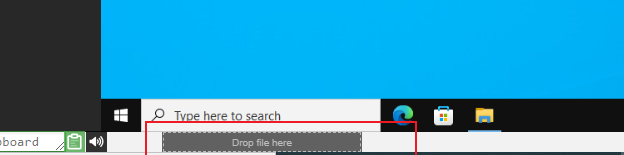
For now, transfers handle one file at a time. If you need to move multiple files, just zip them into an archive and drag and drop that. The transfer mechanism uses chunking to send large files smoothly, and it performs best over a fast fibre connection. The folder structure inside the archive (for instance, the zip file) is preserved.
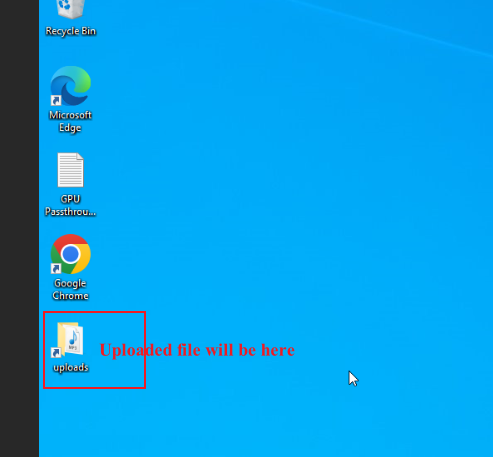
In the Linux templates, a desktop shortcut for the Uploads folder isn't provided right now like it is on Windows. Instead, you'll find the files at:
/home/student/uploads-to-dadesktop
In summary:
OS Templates that currently have this feature enabled
- Debian 12 - v20240314 and newer
- Ubuntu 22.04 - v20240314 and newer
- Ubuntu 24.04 - v20240314 and newer
- Windows 10 - v67 and newer
OS Templates that do not have this feature enabled (as yet)
- Debian 11
- Almalinux
- Kali-linux
- Any older versions of the templates
Keep in mind that we'll be rolling out more improvements to this early-stage feature soon.
If you have feedback, reach out to us via DaDesktop Technical support chat.